
By Mihaela Krznar on 20 October 2026
Every company has at least one workflow held together by spreadsheets, forwarded emails and a colleague who “just knows how it works.”
Until that colleague takes a holiday. And suddenly a routine process becomes a small operational crisis. Nobody knows which spreadsheet is the latest, why three systems contain three different numbers or which steps can be skipped without breaking something.
This is where business process automation can make a difference. And, increasingly, where AI enters the picture.
But the thing is that not every workflow needs AI. Some need a better integration, while others need a few rules and a decent database. And yes, some genuinely benefit from AI that can interpret documents, classify information or coordinate several tasks across business systems.
The challenge is knowing which is which.
In this guide, we’ll look at which business processes are worth automating first, where AI adds value, what can go wrong and how to determine whether an automation project is worth the investment. We’ll also look at practical examples, including how Velebit AI has approached spreadsheet-heavy processes and automated data extraction in production environments.
AI workflow automation uses artificial intelligence to perform or support tasks within a connected business process. This can include interpreting documents, classifying information, summarising conversations, extracting data, recommending actions and triggering subsequent steps in other systems.
For example:
A customer sends an email asking about an order. A conventional workflow might forward the message to customer support. An AI-powered workflow could classify the request, retrieve the order status, draft a relevant response and update the support ticket.
The important part is what happens after the AI has produced its output. The workflow still needs clear rules, system access, validation and a way to handle cases it cannot resolve reliably.
This is why AI workflow automation is broader than asking a chatbot to do something. It connects AI capabilities to the actual work a business needs to get done.
Traditional business process automation works well when the steps and rules are predictable. If a submitted expense report exceeds a predefined threshold, for instance, the system can route it to the appropriate manager.
AI becomes quite useful when the workflow involves information that is less predictable: an invoice in an unfamiliar format, a supplier email with an ambiguous request or a product description that does not fit neatly into predefined categories.
An automated workflow might combine both approaches:
The result is often more dependable than asking an AI model to make every decision from beginning to end.
For a more autonomous and multi-step process, AI agent development may be appropriate. Agents can work across connected tools and follow defined workflows, with business logic and human decision checkpoints where needed.
The best candidates are generally processes that occur frequently, consume meaningful amounts of manual effort and have a clear definition of what a successful outcome looks like.
They should also have accessible data and a way to detect errors. If the process is poorly understood, nobody knows what “correct” looks like or the consequences of an incorrect decision are significant, automating it immediately is unlikely to be the right move.
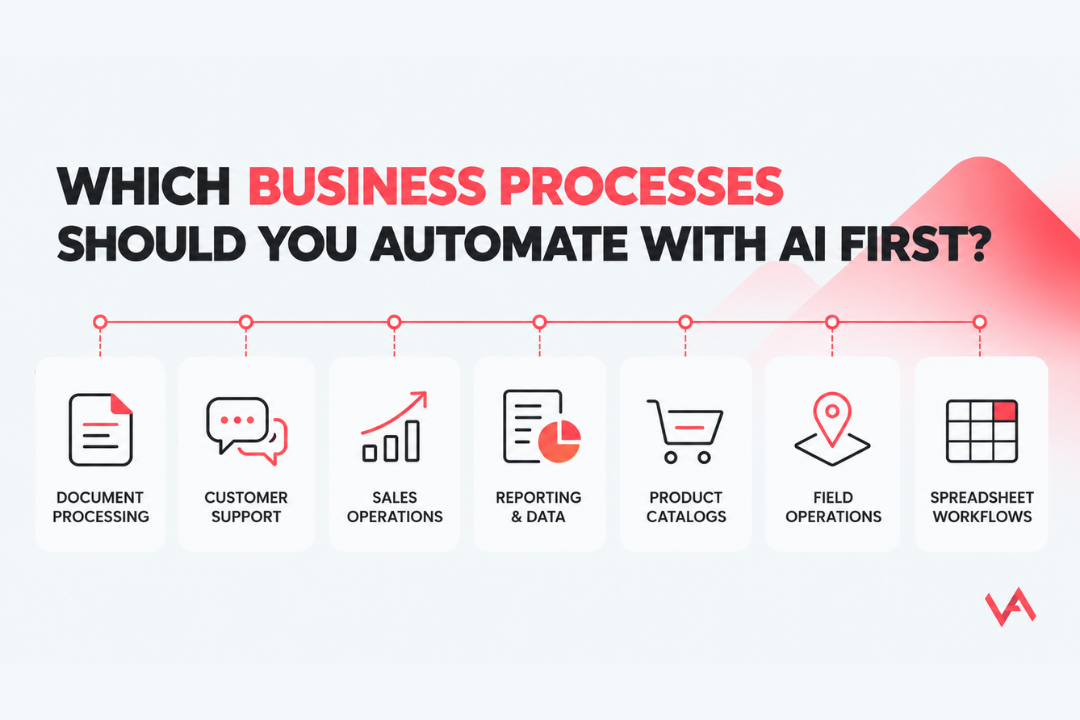
Here are seven strong areas to investigate:
| Business process | What can be automated | Where AI adds value |
|---|---|---|
| Document processing | Extracting, checking and transferring information from documents | Handling varied layouts, language and document formats |
| Spreadsheet-heavy processes | Calculations, data transfers, reporting and validation | Interpreting information where genuinely needed; often the bigger win is better software and data architecture |
| Customer support | Classifying requests, retrieving information and drafting responses | Understanding natural-language requests and summarising context |
| Sales operations | Research, CRM updates, call summaries and follow-up preparation | Interpreting conversations and synthesising information across sources |
| Reporting and data consolidation | Collecting data, preparing reports and flagging inconsistencies | Summarising unstructured information and identifying patterns |
| Product catalog management | Categorisation, tagging, attribute extraction and duplicate detection | Interpreting descriptions, images and inconsistent product data |
| Field and asset operations | Reading labels, recording asset information and routing exceptions | Extracting relevant data from images and variable input formats |
These are starting points, not a ranking that applies to every business. A company processing thousands of invoices may benefit most from document automation. An online marketplace may see more value in product classification. A consulting firm might first tackle the spreadsheet that everyone is afraid to touch.
The right choice depends on where the business is losing time, money or operational reliability.
Before choosing a tool or commissioning a custom solution, ask five questions about the workflow.
1. How often does it happen?
A task performed hundreds of times a week deserves more attention than an unusual task performed twice a year. Frequency matters because even small improvements can accumulate across a large volume of transactions.
2. How much manual work does it involve?
Look at the entire process, not just the most visible task. An employee may spend only two minutes entering information but another ten minutes checking it, correcting mistakes and transferring it into a second system.
3. Can you define a correct result?
A process needs measurable success criteria. That might mean correctly extracting invoice fields, routing a support request to the right team, or calculating a result consistently. You do not need every input to be identical, but you do need a way to assess the output.
4. Is the required data accessible?
Automation becomes difficult when information is fragmented, inconsistent or locked inside systems that cannot be integrated. The answer may be a data-engineering project or process redesign before AI enters the picture.
5. What happens if the system makes a mistake?
Automatically tagging a product incorrectly is inconvenient. Sending a payment to the wrong recipient is considerably more serious. The level of automation should reflect the potential consequences, including whether an action can be reversed and whether a person needs to approve it.
A practical approach is to score each candidate against these five questions, shortlist the strongest opportunities and compare their expected impact with implementation effort and risk.
This is also the logic behind Velebit AI’s consultancy services: assessing business needs, identifying high-value use cases and determining what should happen next. The objective is to find the right starting point tailored to your business problem.
Let’s move from theory to what these workflows can actually look like.
Documents are a natural starting point because businesses frequently need to transfer information from one format into another.
Think about invoices, purchase orders, contracts, equipment labels or application forms. Someone receives the document, locates the necessary information, enters it into a system and checks whether the result is correct.
An automated workflow can handle much of this:
AI can be useful when documents vary in layout or content, but conventional validation is still essential for checking whether the extracted information makes sense.
Velebit AI applied this principle in its work with Data Fleet, an asset information management company. Field workers previously had to manually record information from equipment labels. Standard OCR tools did not provide sufficiently reliable extraction for the required fields and formats, so we developed a solution combining OCR, image alignment and custom processing logic. The workflow extracted the relevant data from label photos, validated the results and flagged cases that did not meet its acceptance criteria for manual review.
The solution was integrated into a production API, allowing it to work with the client’s existing software.
Read the Data Fleet automated label data extraction case study for the technical details.
When is this worth automating? When employees regularly extract the same categories of information from large numbers of documents and the time or errors involved can be measured.
Sometimes a spreadsheet is not merely a spreadsheet. It is an undocumented business application that has gradually become essential to the company.
It may contain complex formulas, interdependent sheets, manually copied data and years of accumulated knowledge. Everyone knows it is fragile, but replacing it feels risky because nobody wants to discover what breaks after switching it off.
In these cases, adding AI may not be the first solution to consider. The real opportunity may be to redesign the process, centralise the data, automate calculations and build an application that is easier to maintain.
Velebit AI did exactly this for a consulting and engineering company working in energy, environmental protection and sustainable development. The client relied on a fragmented collection of Excel spreadsheets to manage complex calculations and reporting.
We then developed a centralised web application that automated a calculation process that had previously required around five days of manual work. It also made historical calculations easier to trace and reproduce while reducing reliance on individual employees who understood the spreadsheet logic.
Read the full Excel workflow automation case study.
When is this worth automating? When spreadsheets have become difficult to maintain, manual transfers create avoidable errors, or critical business knowledge is trapped in files that are hard to reproduce and share.
Sales teams spend plenty of time selling. Unfortunately, they also spend time preparing to sell, recording what happened, finding potential customers and maintaining their CRM.
AI workflow automation can help gather information from approved sources, enrich lead records, summarise customer conversations, flag missing CRM fields and prepare follow-up messages.
For example, after a discovery call, an AI-powered workflow could generate a structured summary, identify the prospect’s stated needs, suggest CRM updates and prepare a follow-up email. The sales representative reviews the proposed changes before anything is sent.
A separate workflow could gather company information from multiple sources, consolidate the findings and highlight potential sales opportunities for further investigation.
Velebit AI contributed to the development of a data-driven sales intelligence tool for Selli AG. The work included automating a pipeline that ingested information from different sources, cleaned and combined the data and made it available for identifying potential customers and growth opportunities.
Explore the Selli sales intelligence case study to see how data engineering can support sales operations.
When is this worth automating? When salespeople repeatedly perform administrative tasks or manually collect information that could be gathered and prepared more consistently.
Customer support is often discussed as an AI automation opportunity, but “replace support with a chatbot” is a rather blunt way to approach it.
A more useful question is which parts of the support workflow are repetitive enough to handle reliably.
An AI-supported process can classify incoming requests, find relevant information in an approved knowledge base, retrieve order or account details, draft a response and route unresolved cases to the right team.
For internal service desks, similar workflows can categorise IT requests, suggest troubleshooting steps and direct employees to the relevant documentation.
Start with one clearly defined category of requests. Measure whether the workflow resolves them correctly before expanding to more complex cases.
When is this worth automating? When a team handles high volumes of recurring requests, the answers can be grounded in reliable sources, and exceptions can be escalated without creating more work than the automation saves.
Product data can be a deceptively expensive operational problem. Sellers submit inconsistent descriptions, products arrive without all the required attributes, and similar listings may be categorised differently.
At scale, reviewing every listing manually becomes difficult.
AI can assist with product categorisation, attribute extraction, product tagging, duplicate detection and the interpretation of product images. A workflow can process a new listing, suggest a category, identify missing fields and flag possible duplicates before publication.
Velebit AI has developed these capabilities for online marketplaces and e-commerce businesses. Its product categorization solution uses machine learning to help assign products to relevant categories, while duplicate detection addresses the challenge of identifying repeated content or listings.
The underlying business problem is illustrated by Velebit AI’s work with KupujemProdajem, a marketplace with more than six million active listings across over 1,600 categories. We improved the platform’s product categorisation model, including the difficult long-tail categories where relatively few examples were available.
Read the AI categorisation case study for a marketplace with 3M+ users.
When is this worth automating? When product volumes are high, manual classification creates delays or inconsistency, and the business can evaluate the quality of predicted categories and extracted attributes.
A surprising amount of office work consists of collecting information from different systems, checking whether the numbers match and turning the results into a report.
Some of this does not require AI at all. If the data is structured and the transformation rules are clear, conventional data pipelines and reporting tools may be the most appropriate solution.
AI becomes useful when the workflow also involves interpreting unstructured content, summarising changes, categorising observations or preparing explanations that help a person investigate a result.
For example, a weekly operations workflow could consolidate metrics from several systems, compare them with agreed targets and highlight unusual changes. A person would then investigate the causes rather than relying on a model to invent an explanation.
This kind of work also depends on a reliable data foundation. Velebit AI’s Data and ML Engineering services cover the infrastructure and data workflows needed to make information usable by downstream applications and models.
When is this worth automating? When reporting is repetitive, information is scattered across systems and the organisation spends a significant amount of time preparing data instead of acting on it.
Field workers often collect information on site and then transfer it to a digital system: equipment specifications, serial numbers, maintenance records or inspection results.
This creates a familiar bottleneck. The work is completed in the field, but the information still has to be entered, formatted and checked afterwards.
AI can help read information from images, extract relevant fields, compare the results with expected formats and transfer validated records to a central platform.
The Data Fleet project described earlier is a concrete example of this approach. Instead of asking workers to manually type the information printed on equipment labels, the workflow allowed them to capture a photo and automatically extract the required data.
When is this worth automating? When data collection is repetitive, inputs come in variable formats, and the information must be transferred into operational systems after each inspection or service visit.
Start with a frequent, time-consuming process with a clear outcome and manageable risk. Document processing, sales administration, product categorisation, reporting and spreadsheet-heavy operations are all potential candidates. Compare expected value, technical feasibility and the consequences of errors before choosing.
Sometimes, but end-to-end autonomy is not always necessary or desirable. Many effective workflows combine AI with conventional rules, software integrations and human approvals. The right level of autonomy depends on the complexity of the task and the consequences of a mistake.
It can be, provided the expected benefit justifies the implementation and ongoing costs. A smaller business may benefit from automating one high-volume workflow rather than building a complex AI agent. Existing software integrations and simpler automation tools should also be considered.
There is no universal price. Costs depend on the process, data readiness, integrations, model requirements and maintenance.
Use appropriate permissions, data-access controls, validation, logging and escalation procedures. Test realistic exceptions, define which actions require human approval and monitor the system after launch. For higher-impact decisions, keeping a person accountable is essential.
Improve the process before automating it. Automating unnecessary steps can make an inefficient workflow faster without making it better. Mapping the workflow first often reveals opportunities to remove handoffs, simplify approvals or improve the underlying data.
AI workflow automation can reduce repetitive work, improve data quality and help teams scale processes that would otherwise require increasing amounts of manual effort.
But the best opportunities are not necessarily the most sophisticated ones. They are the workflows where the business problem is clear, the improvement can be measured and the chosen technology can deliver a dependable result.
Start by identifying the work that repeatedly slows your team down. Understand why it happens, determine whether AI is genuinely needed and test the smallest useful solution before expanding it.
Not sure where AI automation would deliver the most value in your business?
Velebit AI’s Agentic AI Workshop helps businesses identify high-value AI opportunities, assess data and infrastructure readiness, and define a practical implementation roadmap.
If you are exploring a broader automation challenge, Velebit AI also offers AI consultancy to help assess your requirements and identify the right technical approach.
Partner with us to develop an AI solution specifically tailored to your business.
Contact us